Two decisions
Every guide below works the same way: the platform builds the repo's Dockerfile, CodePlans applies its database migrations when it starts, and you create the first account in the browser using a setup code from the server log.
master is the latest release line./data. One instance.DATABASE_URL and AUTH_SECRET. There's no SQLite→Postgres move yet, so pick it up front if you'll need it.Deploy on Railway
All in the browser. The repo's railway.json tells Railway to build the Dockerfile and to check /api/health before switching traffic to a new deploy.
Create a service from your fork
At railway.com choose New Project → Deploy from GitHub repo and pick your fork. The first time, Railway asks you to install its GitHub app and choose which repositories it can see.
Railway starts building straight away. The first deploy stops with a volume error on SQLite. That's expected: CodePlans won't run on storage that each deploy wipes. The next step fixes it.
Attach storage
On the project canvas, right-click the CodePlans service → Attach volume, and set the mount path to
/data. Railway redeploys the service with the volume in place.Using Postgres instead? Skip the volume. Choose + Create → Database → PostgreSQL. Then on the CodePlans service open Variables and addDATABASE_URL=${{Postgres.DATABASE_URL}}, andAUTH_SECRET= the output ofopenssl rand -base64 32.Give it a public address
Open the service → Settings → Networking → Generate Domain. If Railway asks for a port, accept the one it suggests. CodePlans picks up the domain by itself, so there's no URL to configure.
Copy the setup code from the logs
Open Deployments, click the latest deployment, then Deploy Logs. Look for the
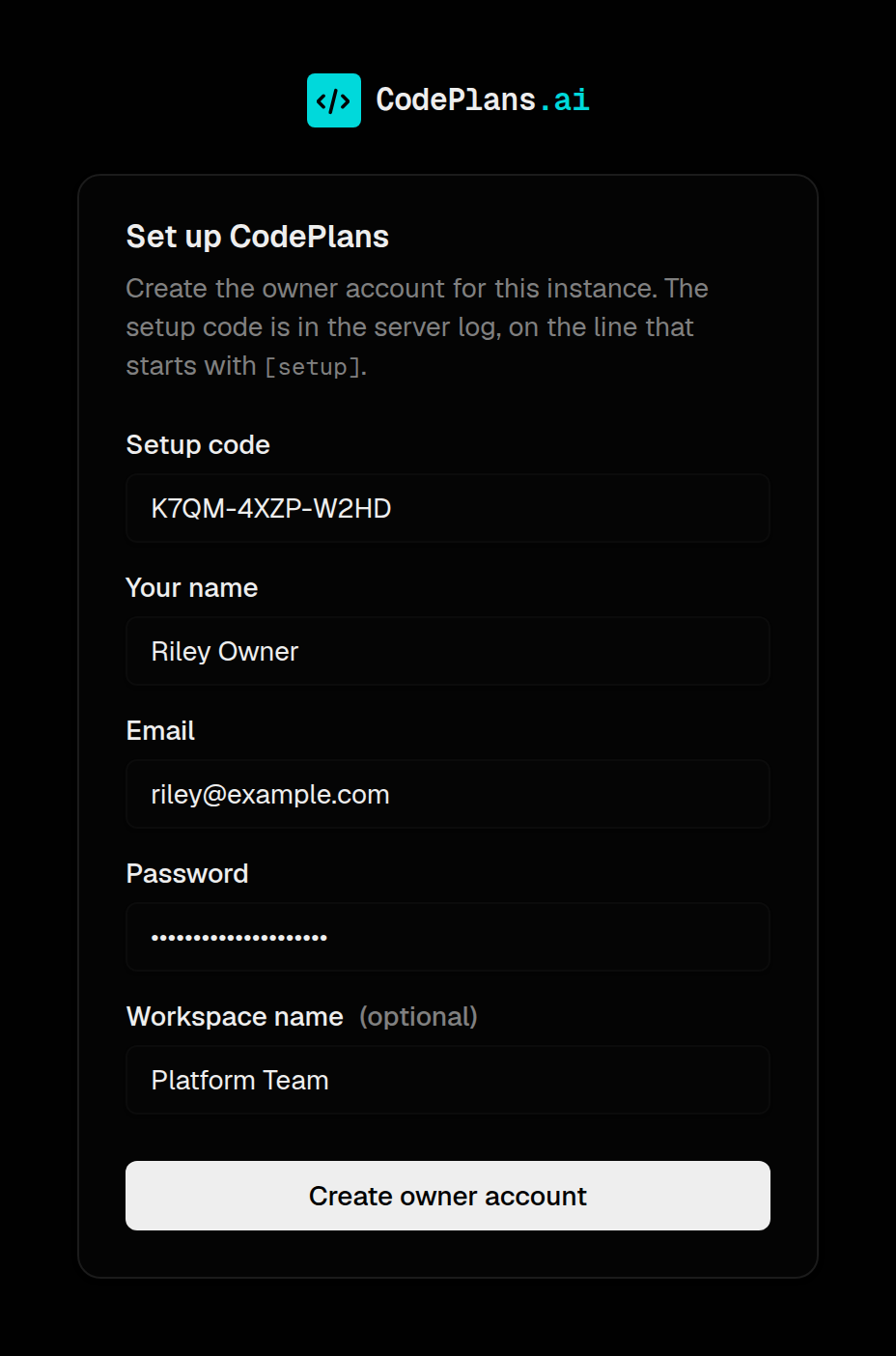
[setup]line:[boot] migrations: applied 33, 33 total, schema up to date [setup] No accounts yet. Open https://codeplans-production.up.railway.app/setup and enter the setup code: K7QM-4XZP-W2HDOpen the deployed service and claim it
Open the domain. Any page sends you to
/setup. Enter the setup code, your name, email and password, and a workspace name. You're signed in as the owner, and/setupcloses for good.
Deploy on Fly.io
From a terminal with flyctl installed. The repo's fly.toml sets up SQLite on a 1 GB volume, on one machine that sleeps when idle.
Get the code and sign in
git clone https://github.com/<you>/CodePlans.git && cd CodePlansfly auth loginCreate the app
fly launch --copy-config --no-deployPick an app name and region. Decline any offer to add a database: the volume comes from
fly.toml.Deploy
fly deployThe first deploy creates the
codeplans_datavolume. If it says the volume is missing, runfly volumes create codeplans_data --size 1 --region <region>and deploy again.Using Postgres instead? Delete the[[mounts]]section fromfly.toml. Create a database withfly mpg createand attach it withfly mpg attach <cluster> -a <app>, which setsDATABASE_URL. Also runfly secrets set AUTH_SECRET=$(openssl rand -base64 32).Copy the setup code
fly logs # look for the [setup] lineOpen it and claim it
fly openEnter the code at
/setupto create the owner account.
git pull and fly deploy. Keep SQLite apps on one machine (fly scale count 1). Set AUTH_URL if you add a custom domain.Deploy on Render
In the browser. Persistent disks need a paid instance type. Use Postgres if you want to stay on a free one.
Create a web service from your fork
In the Render dashboard choose New → Web Service, connect GitHub and pick your fork. Render detects the Dockerfile, so leave the language as Docker.
Attach storage
Choose a paid instance type. Under Advanced, Add Disk with mount path
/dataand 1 GB. Set Health Check Path to/api/health, then Deploy Web Service.Using Postgres instead? Skip the disk. Create New → Postgres, copy its Internal Database URL, and add it to the web service's Environment asDATABASE_URL, withAUTH_SECRET=openssl rand -base64 32.Copy the setup code
Open the service's Logs and find the
[setup]line.Open it and claim it
Open the
onrender.comaddress at the top of the service page and enter the code at/setup.
Any server with Docker
A VM, a home server or a NAS. The named volume keeps the database across upgrades.
Build and run
git clone https://github.com/SylonZero/CodePlans.git && cd CodePlansdocker build -t codeplans .docker run -d --name codeplans -p 3000:3000 -v codeplans-data:/data --restart unless-stopped codeplansCopy the setup code
docker logs codeplans | grep setupOpen it and claim it
Go to
http://<server>:3000and enter the code. Behind a reverse proxy or on a domain, add-e AUTH_URL=https://your.domaintodocker run.Using Postgres instead? The deployment guide has acompose.yamlwith CodePlans and Postgres together.
git pull, rebuild, then docker rm -f codeplans and run the same docker run again. The volume keeps your data.Claim it, then invite your team
The setup page asks for the code from the log, then your name, email, password and a workspace name. Only someone who can read the server log can claim the instance. The code stays the same across restarts, so you can come back to it.
Next, invite people from the Team page. Sign-up is invite-only unless you set REGISTRATION=open. Then connect AI agents at https://<your-domain>/api/mcp with a key from Settings → API Keys. Email and Slack notifications are set up in Settings → Workspace too.
Prefer no browser step? Set ADMIN_EMAIL and ADMIN_PASSWORD before the first start.
If something's off
"…is not on a persistent volume"
The service is on SQLite without a volume, so CodePlans refuses to start rather than lose your data on the next deploy. Attach a volume at /data (the log names the exact path), or switch to Postgres.
No [setup] line in the logs
It only appears while the instance has no accounts. If someone already claimed it, sign in instead. Otherwise restart or redeploy the service and look again.
The health check keeps failing
Look further up the log. A failed migration or a missing AUTH_SECRET on Postgres stops the server on purpose and says why. The previous deploy keeps running meanwhile.
Sign-in fails on a custom domain
Set AUTH_URL to the public address, e.g. https://codeplans.yourteam.com. Platform domains are detected automatically. Serving more than one domain? Leave AUTH_URL unset and set AUTH_TRUST_HOST=true.
Signed out everywhere
Expected after a password change or reset: every other session of that account ends. Sign in again with the new password.
Someone can't sign up
That's the invite-only default. Invite them from the Team page, or set REGISTRATION=open to let anyone who can reach the server join.
Every setting
The self-host page and the deployment guide list every environment variable, backups and health checks.